> For the complete documentation index, see [llms.txt](https://help.pandatool.org/llms.txt). Markdown versions of documentation pages are available by appending `.md` to page URLs; this page is available as [Markdown](https://help.pandatool.org/english/sol/taxclaim.md).
# Claiming Token2022 Transfer Fees Guide
## **Understanding Fee Collection**
**1. Which tokens support fee claiming?**
Only **Token2022** (created with transfer fee functionality) allow manual fee collection. Standard SPL tokens do not support this feature.
**2. Why manual claiming?**
Fees accumulate in an on-chain pool instead of being distributed automatically. Designated fee-collecting wallets must initiate claims to access these funds.
**3. Who can claim fees?**
Only the **fee-collecting wallet** specified during token creation has permission. Even the token authority wallet cannot claim fees.
## Claim Solana Token2022 Tax Steps
Step 1: Open PandaTool and link your wallet
Step 2: Select a token (enter the token address)
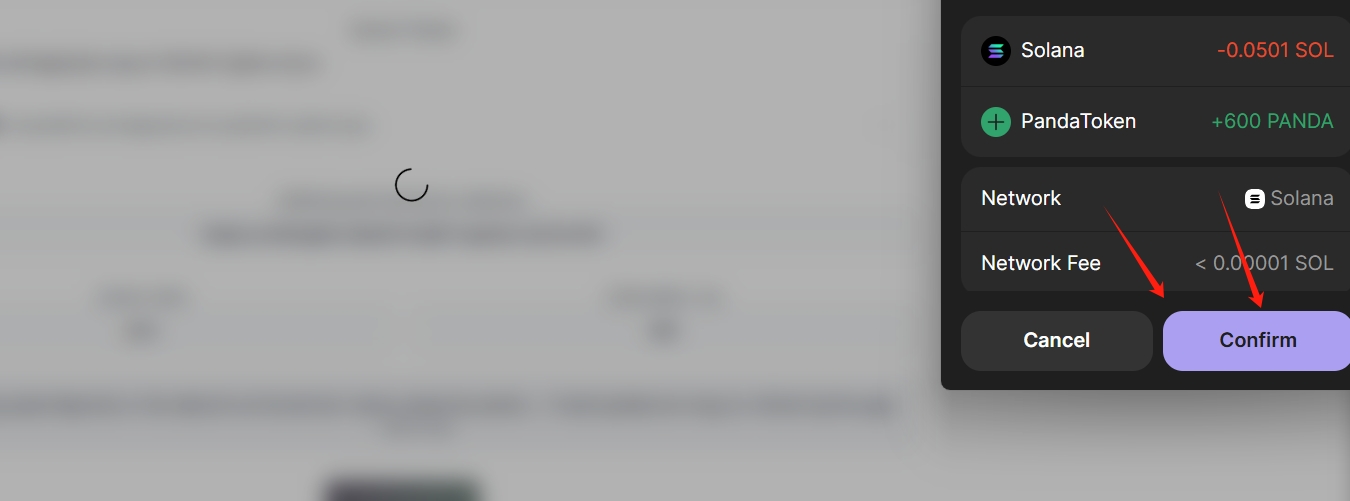
Step 3: Click withdraw and confirm with your wallet
## **Step-by-Step Claiming Process**
### **Step 1: Access Tool & Connect Wallet**
1. Go to [PandaTool Fee Claim Portal](https://solana.pandatool.org/en/taxClaim)
2. Click **Connect Wallet** (supports Phantom/OKX/TokenPocket)
### **Step 2: Select Token**
1. The tool auto-detects Token2022 tokens in your wallet
2. Select target token from dropdown
3. System displays:
* Token Rate and Claimable Tax amount
* Withdrawal Authority Address
**Step 3: Claim Fees**
1. Click **Claim Tax**
2. Approve transaction in wallet
3. Fees transfer to your wallet instantly
## **FAQs**
**Q1: Can non-fee-collecting wallets claim?**
> No. Fee claiming is **exclusively permitted** to the designated wallet.
**Q2: Do unclaimed fees expire?**
> No. Fees remain **permanently stored** in the on-chain pool.
**Q3: Can I claim fees for tokens created elsewhere?**
> Yes. Works for **any Token2022 token** regardless of creation tool.
**Q4: What's the claiming cost?**
> Fixed **0.05 SOL per claim**. We recommend accumulating fees before claiming to optimize costs.
*Need assistance? Join our English developer community:*\