> For the complete documentation index, see [llms.txt](https://help.pandatool.org/llms.txt). Markdown versions of documentation pages are available by appending `.md` to page URLs; this page is available as [Markdown](https://help.pandatool.org/english/sol/createbonk.md).
# Launch Tokens On BonkFun and Bundle Buys Guide
How to Create and Deploy a Token on BonkFun in Minutes
**BonkFun** (also known as **LetsBonk**) is a rapidly emerging token launch platform following Pump.fun. It has significantly surpassed Pump.fun in both token creation volume and transaction count. Deeply integrated with the native BONK community, **96.5% of BonkFun’s daily on-chain activity consists of organic transactions** with no signs of artificial manipulation, making it widely regarded as better aligned with genuine community needs.
Moreover, compared to Pump.fun, **BonkFun operates on a grander scale**: it allocates a larger share of transaction fees to community governance and redistributes a portion of revenue to **BONK holders and ecosystem builders**, reinforcing its "Community-as-Platform" circular incentive model.
**PandaTool’s BonkFun One-Click Token Launch Tool** empowers you to seamlessly create tokens and enable multi-wallet buying on BonkFun.
## BonkFun Token‑Launch Prerequisites
* **Desktop:**Before you launch tokens, first install the Phantom Wallet Plugin Extension
* **Mobile:**You can also launch tokens via the Phantom Mobile Wallet or OKX Web3 Wallet.
## **BonkFun Token Launch Guide**
1. **Open PandaTool & Connect Wallet**
2. **Fill in Mandatory Token Parameters**
3. **Fill in Optional Token Parameters**
4. **Create Immediately**
## **BonkFun Token Launch Tutorial**
### **1. Open PandaTool**
Navigate to PandaTool’s BonkFun launch page:\
Click the Phantom‑wallet plugin in the top right.
* If the connection succeeds, your wallet address appears in the corner.
* If it fails, install the Phantom extension first
On mobile, connect via OKX Web3 Wallet or Phantom Mobile Wallet to launch tokens.
### 2. Fill in the token parameters
Enter the basic token details:
* **Name**: Up to 30 characters (supports Chinese, English, or mixed).
* **Symbol**: Up to 10 characters (supports Chinese, English, or mixed; pure Chinese limited to 3 characters).
* **Description**: Up to 200 characters describing your token.
* **Logo**: JPG or PNG, max 1 MB.
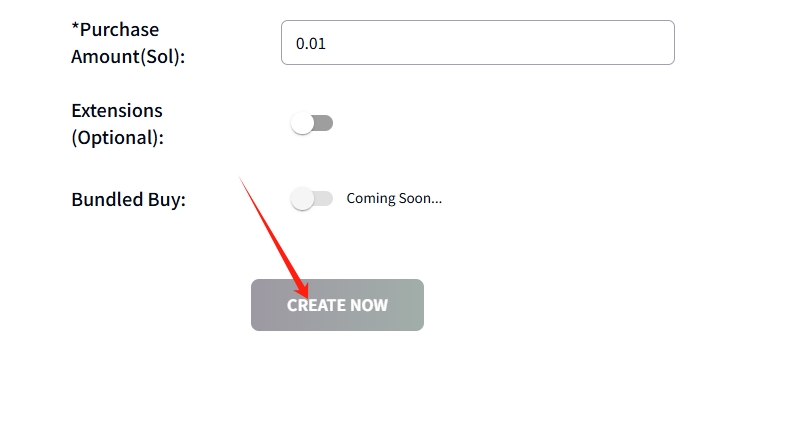
* **Purchase Amount**: How much SOL the launch (dev) address will spend to buy tokens in the launch process (min 0.01 SOL, max 70 SOL).
* **Total Supply**: Fixed at 1,000,000,000 (cannot be changed).
* **Decimals**: Fixed at 6 (cannot be changed).
### 3. (Optional) Fill in social links
These fields are optional and immutable once your token is created:
* **Website**
* **Telegram**
* **Twitter**
* **Discord**
* **Tags**: 0–5 tags
Once you’ve entered all desired information, click **“Create Now.”**
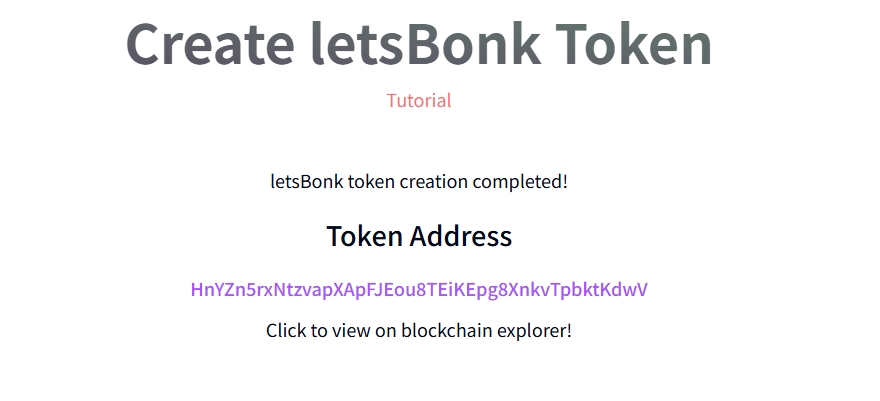
Wait about 10 seconds for on‑chain processing and the wallet confirmation, and your token will be live on LetsBonk.
If you only want to **create a token**, then you’re done at this point. If you want to **bundle buy**, we can continue to the next step.
## BonkFun Bundle Buy Tutorial
### What is bundle buying?
Similar to PumpFun, there are many sniper bots on BonkFun that rush in to buy a large amount of your token at a low price right after launch, then sell when the price rises to take profit. To solve this problem, we introduced the **launch-and-buy bundle** feature.
In simple terms, when you launch a token on LetsBonk, you can simultaneously bundle other wallet addresses so that at the very moment of launch, these bundled addresses are allowed to buy tokens instantly. By integrating the **Jito** function, we can ensure these addresses buy much earlier than the bots, thus avoiding being arbitraged by them.
Currently, the platform supports **up to 7 bundled addresses**, with a **0.05 SOL fee per bundled address**. This bundling fee is charged to the main wallet.
{% hint style="warning" %}
**Note:** Your main wallet must have enough funds. For example, if you bundle 5 addresses, after deducting the purchase amount, you must have at least **0.3 SOL** remaining to pay the bundling fee.
{% endhint %}
### How to bundle buy?
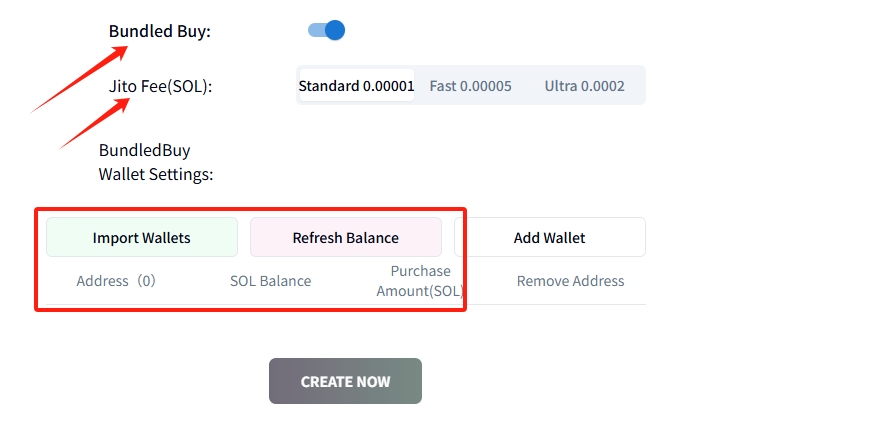
After clicking the bundle buy button, you will see this page:
* **Jito Fee:** Jito is a protocol on the Solana blockchain, and one of its core functions is transaction bundling — packaging multiple transactions into one for execution. This “tip” is essentially a small bribe to Jito to help you complete the bundled transaction.
* **Bundle Buy Settings:** Import the wallet addresses you want to bundle buy from (via private keys) and set the purchase amount.
Click **Import Wallet**, then enter the private keys (one per line).
You will then see the SOL balance in each wallet and can enter the amount of SOL to spend on the purchase.
**Note:** The minimum bundle buy amount is **0.01 SOL**. If it’s lower than this, the token launch may fail.
**Note:** After entering the purchase amount, make sure the connected wallet has enough SOL to cover the bundling fees.
Once all the information is correct, click **Create Now** and wait about 10 seconds. Confirm in your wallet, and your token will be successfully launched.
## BonkFun Token‑Launch FAQs
1. **Why is there no response after clicking “Create Now”?**\
Because on‑chain data needs \~10 seconds to process before the wallet confirmation pops up.
2. **Why did the transaction build fail?**\
Ensure your wallet has enough SOL—your balance must exceed the purchase amount.
3. **What is the supply and decimals for BonkFun‑launched tokens?**\
All tokens on LetsBonk have a supply of 1 billion and 9 decimals.
4. **Can I modify my token metadata after launch?**\
No. BonkFun tokens are permissionless: you cannot mint more, blacklist addresses, or change metadata.
5. **What is the fee to launch on PandaTool?**\
The launch fee is 0.051 SOL.
6. **Do contract addresses end in “bonk”?**\
Yes. All LetsBonk tokens created via PandaTool have addresses ending in “bonk.”
7. **Do I need to add a liquidity pool manually?**\
No. After users buy in, a constant‑product liquidity pool is automatically formed on LetsBonk.
8. **How does a token qualify to launch on Raydium?**\
Once the pool reaches 85 SOL, your token will automatically be launched on Raydium.
If you have any other questions, join our Telegram volunteers at: